
- GitHub repository: https://github.com/farion1231/cc-switch
- Download: GitHub Releases
Key features
🔌 Provider management
- One-click switching — Switch Claude Code, Codex, and Gemini API configurations without manually editing environment variables or config files.
- Multiple endpoints — Each provider can have multiple endpoints, API key management, and latency testing.
- Four-tier model setup — Supports Haiku / Sonnet / Opus / Custom model tiers.
🛠️ MCP server management
- Unified management across apps — Manage Claude / Codex / Gemini MCP servers in one panel.
- Three transport types — Supports stdio, HTTP, and SSE (Server-Sent Events).
- Automatic sync — Supports unified import/export and bidirectional synchronization.
💬 Prompt management
- Multiple preset system prompts — Keep unlimited presets and switch quickly.
- Cross-app support — Claude (
CLAUDE.md), Codex (AGENTS.md), Gemini (GEMINI.md). - Markdown editor — CodeMirror 6 with live preview.
🌐 Multi-platform support
- Desktop apps — Native packages for Windows, macOS, and Linux.
- Web version — Suitable for headless servers and SSH environments.
- CLI version — Supports both interactive mode and command mode.
Connect Dli.li AI
CC Switch supports the ccswitch:// deep-link protocol, so you can import provider settings directly from the Dli.li AI token page.
If you mainly want a routing layer plus model selection for Claude Code, also read CCR. In this docs site, CCR refers specifically to the musistudio Claude Code Router project, which is better for detailed route rules and provider routing.
Official API values on this site
| Type | URL |
|---|---|
| Official default API | https://api.dli.li/v1 |
| Official backup API | https://api.dlizz.com/v1 |
Recommended setup
Claude-related limitation
Setup steps
Open the token dropdown on the Dli.li AI token page Choose CC Switch. The system will launch CC Switch and open the configuration dialog automatically.
Complete the dialog
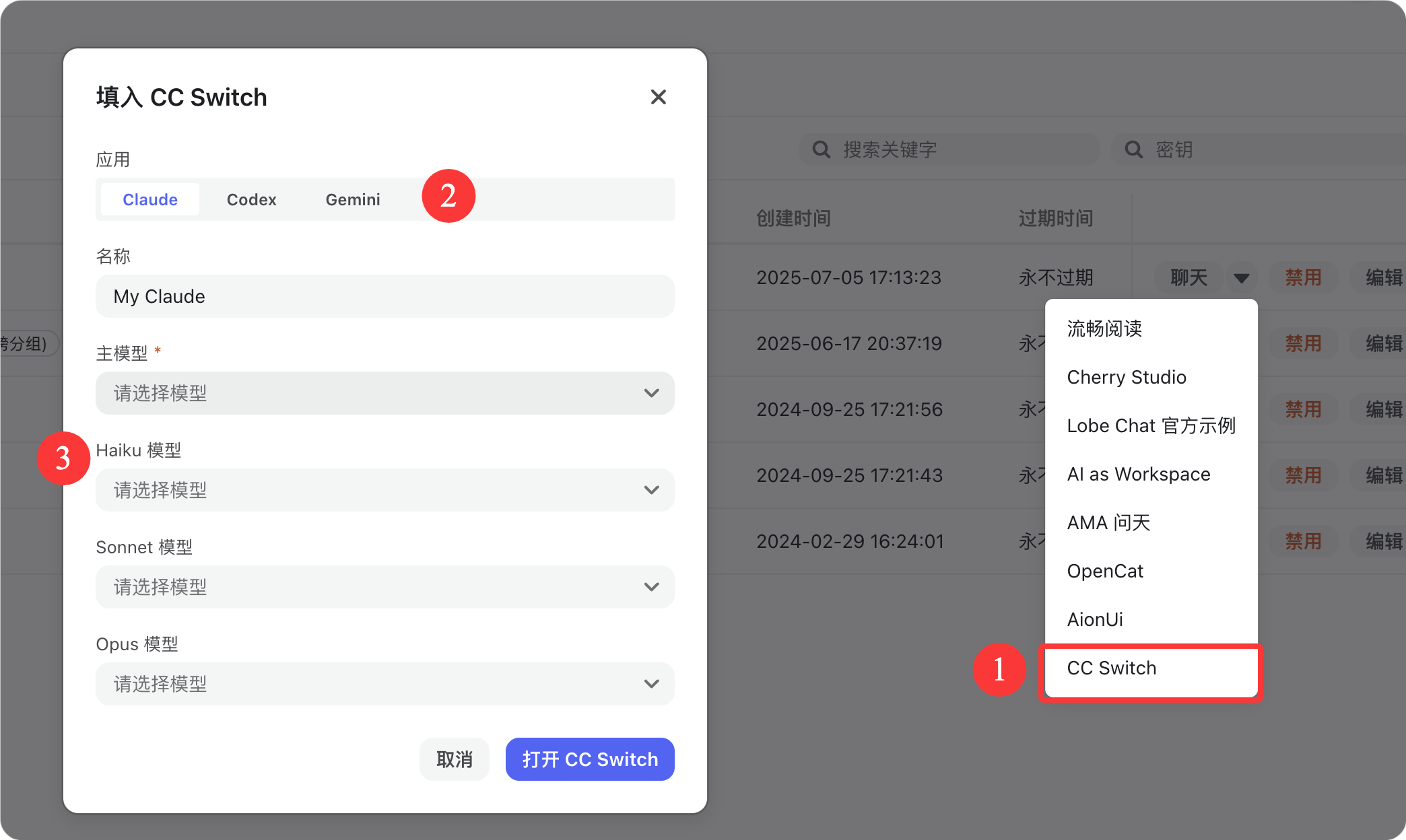
Field meanings:
- Application — Switch between Claude / Codex / Gemini depending on the target app
- Name — A display name such as
My Claude - Main Model — The required primary model
- Haiku Model — Lightweight fast model
- Sonnet Model — Balanced model
- Opus Model — Highest-capability model
All models are selected from dropdown menus. If nothing is selected, the field shows
Please select a model.Recommended habits:
- Claude: choose confirmed Claude-compatible models and avoid assuming
/messages - Codex: use the OpenAI-compatible endpoint
- Gemini: keep the model name exactly the same as the site-exposed name
Finish setup Click Open CC Switch to import the configuration into CC Switch and start using it, or click Cancel to discard the action.
Installation
macOS (Homebrew recommended)
brew tap farion1231/ccswitch
brew install --cask cc-switch
Windows
Download the .msi installer or the portable .zip package from Releases.
Linux
Download the .deb package or .AppImage from Releases.
For Arch Linux:
paru -S cc-switch-binWeb version (headless / SSH server)
wget https://github.com/farion1231/cc-switch/releases/latest/download/cc-switch-web-linux-x64.tar.gz
tar -xzf cc-switch-web-linux-x64.tar.gz
cd cc-switch-web/
./cc-switch-web
The default port is 17666, then open http://localhost:17666 in a browser.